How to track action items from Zoom meetings
A Zoom call ends. Everyone leaves the meeting confident they know what they agreed to. Within a day, half of it is gone.
The decision someone made about the launch timeline. The follow-up that was supposed to unblock the design review. The thing you promised to send by Friday. None of it was written down anywhere reliable, so none of it gets done.
In a survey of 362 professionals, 77 percent said meeting tasks regularly get forgotten or never followed through. Learning to track action items from Zoom meetings reliably is the fix. The cost of not having it shows up as the same conversation held twice, deadlines that slip a week at a time, and the slow erosion of trust when "I'll handle it" stops meaning anything. If you want to know what that gap costs your team in hours and dollars, run the numbers with our ROI calculator.
This guide covers why Zoom meeting action items get lost in the first place, the four approaches teams use today and where each one breaks, the five things any good tracking system has to do, and a 4-step setup that runs without anyone playing note-taker or enforcer.
Why action items from Zoom meetings get lost
The problem is rarely that people don't care. It's that the place where commitments are made and the place where work is tracked are two different places, with a lossy, manual handoff between them.
A Zoom call produces spoken decisions at conversational speed. Someone agrees to do something, the conversation moves on in seconds, and the only record is whatever a participant chose to type into their own notes. Different people capture different things. Some capture nothing. The person who owns the task may have heard it differently from the person who assigned it. No shared list ever exists that says who owns what, by when, and how important it is. The raw material of accountability is never actually created.
Then the meeting ends and the trail goes cold. No one is assigned to chase the items. No one checks in before the due date. Nothing escalates when something slips. Commitments carry no weight because nothing stands behind them. People learn quickly that saying "I'll handle it" is enough on its own, because nothing follows up to test whether they did.
Recurring meetings compound the loss. Your weekly sync generates fresh items every week while last week's incomplete ones quietly disappear. Without context that carries forward, the same topics resurface, the same blockers get rediscovered, and the same work stalls in a loop that feels productive and produces little.
There's also a status problem. Even when items get captured somewhere, the actual progress happens in email and chat, not in the tracker. Someone replies "done" in a thread. Someone else says they're blocked. Neither update reaches the list. The tracker drifts out of date, people stop trusting it, and they fall back on memory. Each failure is small on its own. Stacked across every meeting, every week, they're why a team can run a full calendar of well-intentioned calls and still miss the things that mattered most.
The fix isn't better intentions or stricter meeting hygiene. It's removing the manual handoff so that capture, tracking, and follow-up happen on their own, every time, without depending on a person to remember.
The four approaches teams currently use (and why they fail)
Most teams have tried at least one of these. Each one solves part of the problem and leaves a gap somewhere else.
Manual note-taking
One person types notes during the call and, ideally, shares them afterward. This depends entirely on that person attending, paying attention, and following through every single time. Notes are inconsistent between meetings and between note-takers. Action items end up buried inside paragraphs of context. Owners are implied, not explicitly assigned. Due dates show up as "soon" or not at all. Nothing reminds anyone once the document is closed, and nobody reconciles the notes against what actually got done. It works until the week it doesn't, which tends to be the week it mattered most.
Native Zoom AI Companion summaries
Zoom's AI Companion can generate a meeting summary and surface suggested next steps. For recall, it's genuinely useful, and Streamli9 will happily use that summary as an additional input. The limitation is structural: a summary is a document, not a tracking system. It lives inside Zoom. It isn't connected to your due dates. It doesn't assign an accountable owner you can follow up with by name. It won't message anyone two days before something is due. You still have to read it, pull commitments out by hand, and track them somewhere else. Capture is automated. Accountability stays manual.
Third-party transcription tools (Otter, Fathom, Granola, and others)
Dedicated transcription tools record and transcribe well, and several of them produce a list of action items at the end of the call. The recurring gap is the same as with native summaries: they're strong at capture and weak at the follow-through loop over time. Extracted items sit inside the tool, disconnected from the email threads where status actually changes, and disconnected from any reminder system that nudges an owner before a deadline rather than noting the miss afterward. You end up with yet another tab to check, which is the opposite of what you needed.
Project management tools (Asana, Jira, Linear)
These are excellent systems of record once a task exists inside them. The friction is getting commitments out of a live Zoom conversation and into the tool, accurately, every time, without a human doing manual data entry right after the call when they're already moving to the next meeting. In practice the transfer is partial and delayed. Items discussed in the meeting never make it onto the board. The board stops reflecting reality. People trust it less. They start tracking around it in side channels, and the data gap gets worse, not better.
The tool isn't the weak point. The manual bridge from conversation into the tool is.
What "good" looks like: five things a Zoom action item tracking system must do
Measure any of the approaches above against these five requirements and the gaps become obvious and consistent.
- Capture without manual effort. The system has to read the meeting itself rather than depend on a person typing the right things into the right place. Any step that requires discipline will fail on the weeks discipline is in short supply, which are exactly the weeks the meeting mattered.
- Structured items, not prose. Every commitment needs an explicit owner, a due date, and a priority. A sentence in a summary that mentions a task is not a tracked task. Structure is what makes follow-up and escalation possible at all.
- A follow-through loop over time. Capture is the easy half. The system has to nudge owners before a due date, flag items that go overdue, and keep doing it on a schedule without the meeting host turning into the person who chases everyone. The loop, not the list, is what changes outcomes.
- Passive status updates. People report progress where they already work, which is email and chat, not inside a tracker they have to remember to open. A good system watches those channels and updates the status automatically, so the list stays true without anyone maintaining it.
- Continuity across recurring meetings. Incomplete items from last week's sync should carry forward into this week's instance with their context intact, instead of disappearing and being rediscovered weeks later as if they were new.
Streamli9 was built specifically to satisfy all five of these requirements for Zoom meeting action items, not just the first two. Here's how the setup works.
How to track action items from Zoom meetings in 4 steps
End-to-end setup. Takes a few minutes once, then runs on its own after every call.
Step 1: Connect Zoom
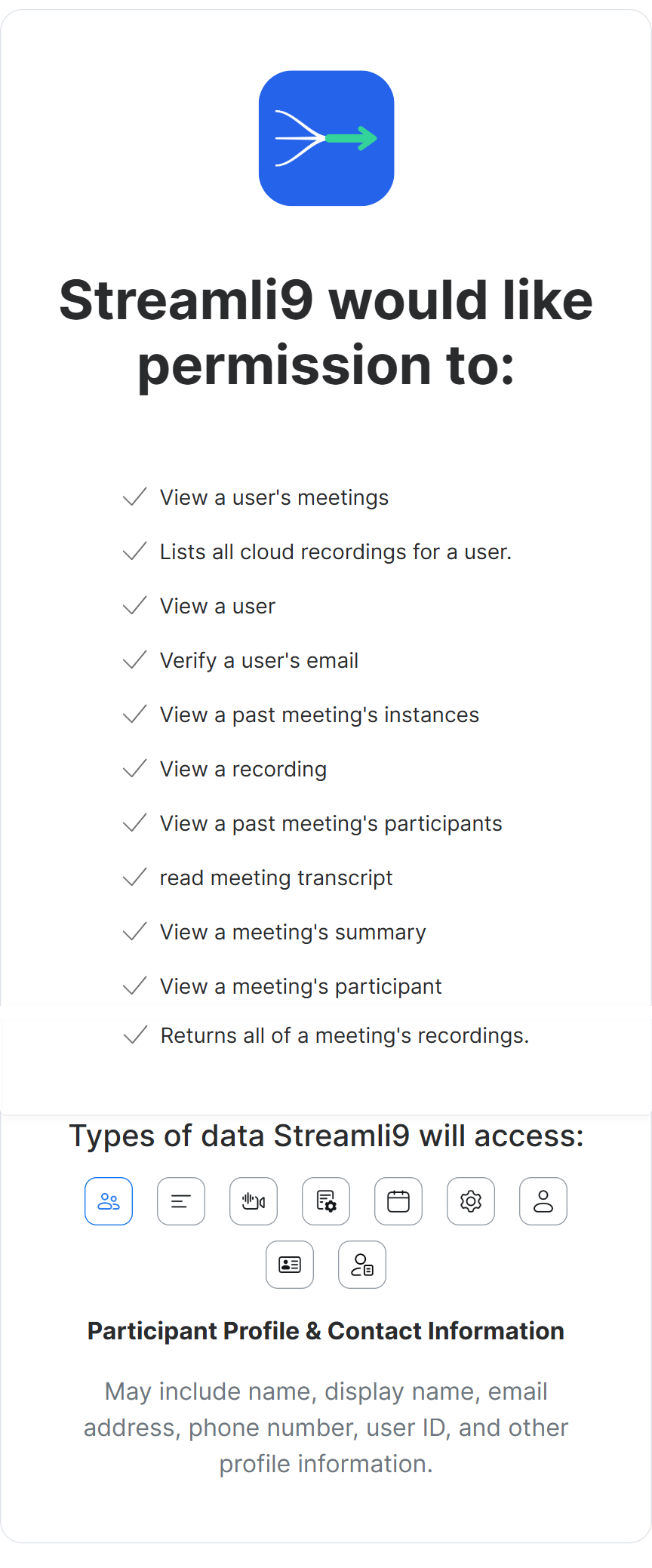
Install the Streamli9 desktop app for Windows or macOS from the Zoom Marketplace approved download page and sign in. Connect your Zoom account through Zoom's standard OAuth consent screen.
Streamli9 requests granular, least-privilege scopes that match Zoom Marketplace requirements: read your meetings, participants, the meeting AI summary, and cloud recording transcripts. Nothing beyond what it needs to do the job. One-time setup, about a minute. You can disconnect at any time from your Zoom account settings.
One honest requirement to know up front. Streamli9 works from the meeting transcript, so the Zoom meeting needs to be cloud recorded with transcription enabled on the account. It's a post-meeting system. No bot joins the call. There's no live capture of audio or video.
Step 2: Hold your meeting
Run the meeting exactly as you normally would. Nothing different to do during the call. No participant to add. No behavior to change.
When the meeting ends and Zoom finishes processing the cloud recording and transcript, Zoom notifies Streamli9 through a secure, signature-verified webhook. If your account also produces an AI Companion summary for the meeting, Streamli9 uses that alongside the transcript, so extraction has more than one signal to work from rather than relying on a single source.
Step 3: AI extracts action items
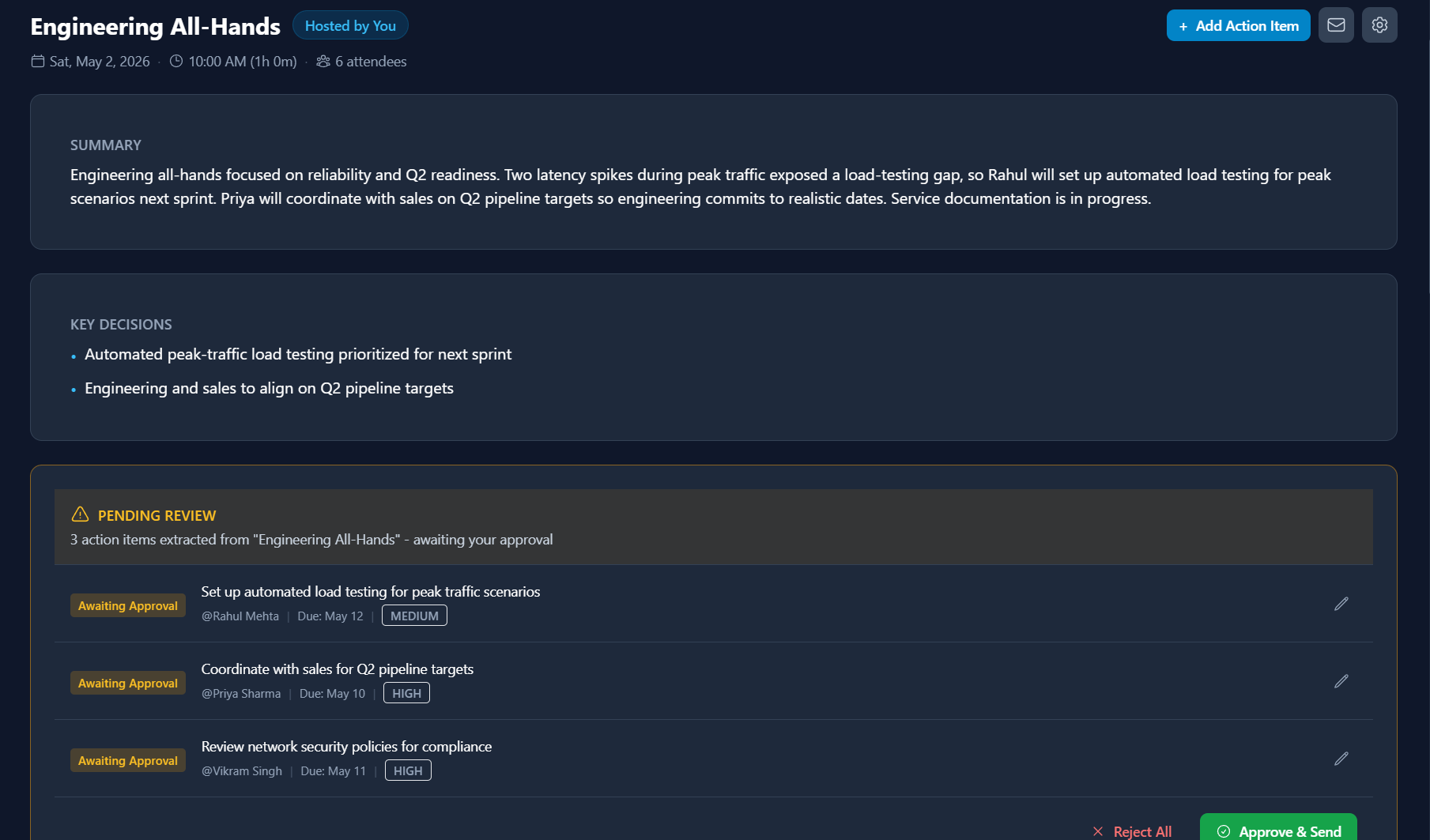
Once the transcript is available, Streamli9 reads it and pulls out every action item, each with an owner, a due date, and a priority. Extraction runs on Anthropic's Claude model, with an OpenAI model wired in as an automatic fallback so a single provider issue doesn't stall processing.
You can review the extracted items before they're tracked, or let meetings you trust auto-approve so there's no manual step at all. Related items that depend on each other are linked, so a blocker and the work waiting on it are visible as a chain rather than as two unrelated tasks.
Privacy is enforced by role across the entire product. As a host, you see all action items from meetings you host. As a participant, you see only the items that belong to you. There is no shared view that exposes one participant's items to another.
Step 4: Automated follow-through
This is the step every capture-only tool skips. It's also the one that changes outcomes.
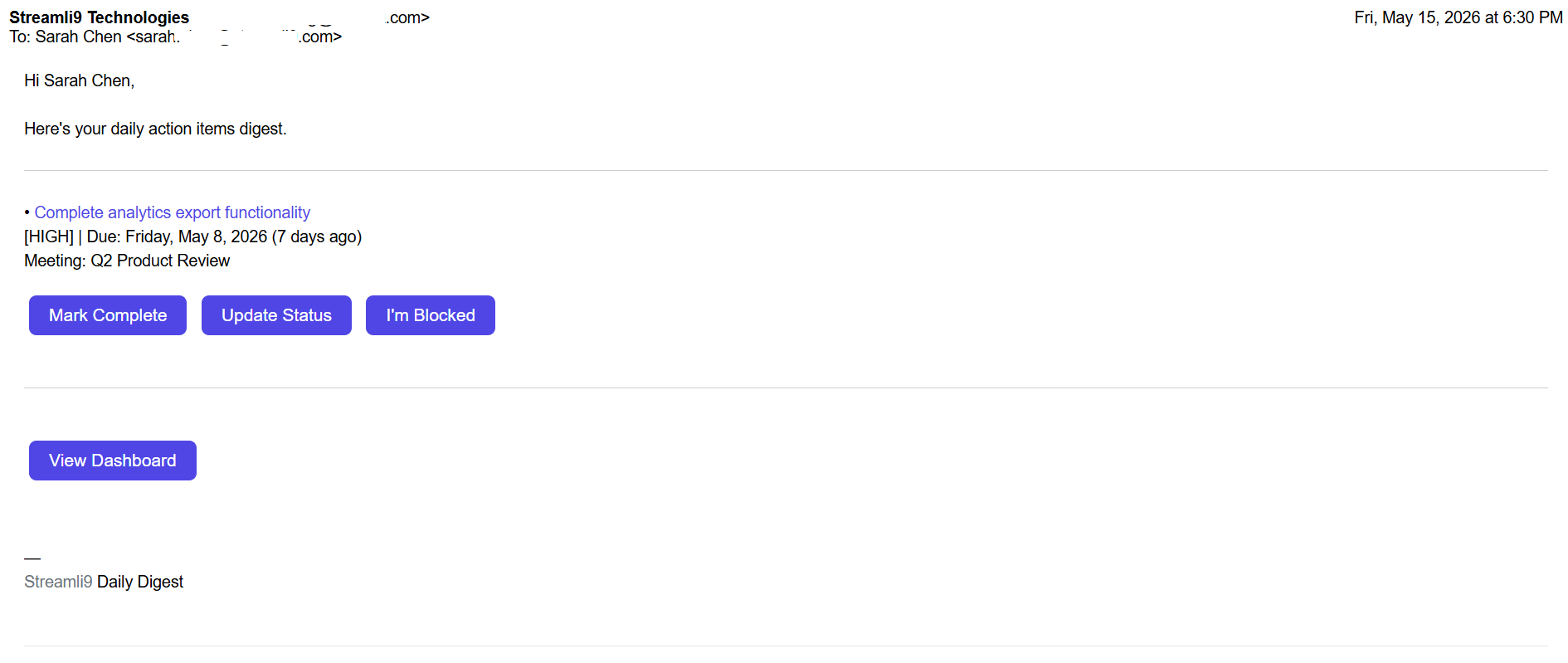
Once items exist, Streamli9 runs the accountability loop. Pre-due reminders go out ahead of the deadline. By default, the system sends a first nudge two days before the due date and a second one day before. Both timings are configurable, and quiet hours are respected so nothing fires overnight. Items that pass their due date escalate as overdue. Reminders are sent from the meeting host's own email address, so to the recipient they read like a normal human follow-up rather than a notification from yet another app.
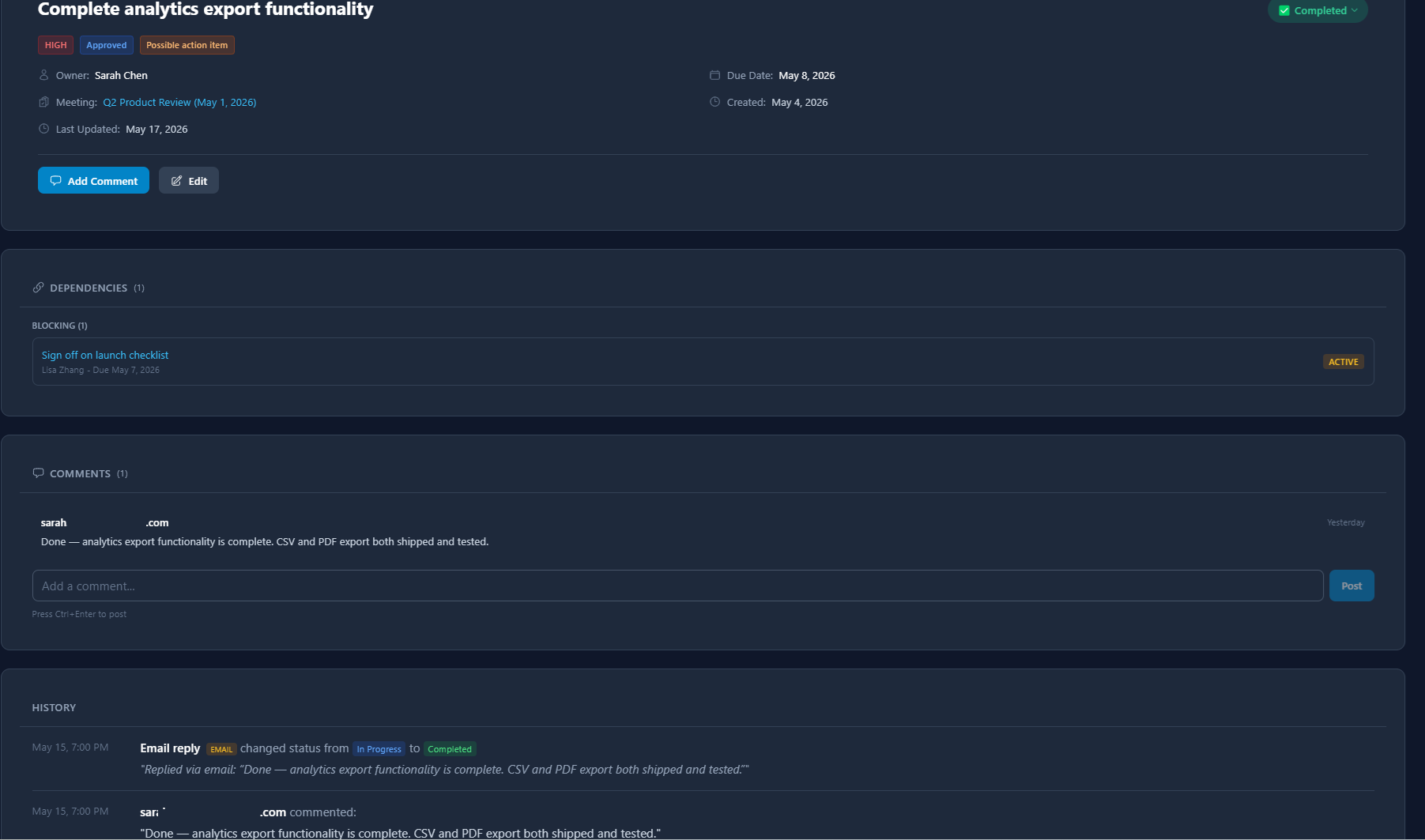
In parallel, Streamli9 monitors connected Outlook email threads (Gmail support is pending Google's CASA security review). When someone replies that a task is done or that they're blocked, the item's status updates automatically, without anyone opening a tracker. For recurring meetings, incomplete items carry forward into the next instance of the series with their context intact, so the weekly sync builds on the last one instead of losing the thread.
FAQ
Does Streamli9 record or join my Zoom meeting?
No. No bot in the participant list. Streamli9 does not capture live audio or video. It works after the meeting, from the Zoom cloud recording transcript, which Zoom delivers through a secure webhook once processing finishes.
Do I need cloud recording turned on for this to work?
Yes. Streamli9 extracts action items from the meeting transcript, so the meeting has to be cloud recorded with transcription enabled on the Zoom account. If a meeting isn't recorded with a transcript, there's no text for the system to read and nothing is extracted.
Which other platforms does it support besides Zoom?
Streamli9 also works with Microsoft Teams and Google Meet, and it can ingest commitments from third-party meeting capture tools (Fireflies, Otter.ai, Read.ai, Grain, tl;dv, and Avoma). It monitors connected Outlook threads for status updates as well (Gmail support pending Google's CASA security review), so the record isn't tied to a single platform.
Who can see the action items from a meeting?
Access follows role, and it's enforced everywhere. If you host a meeting, you see every action item from it. If you attended as a participant, you see only the items that belong to you. No shared view exposes one participant's items to another.
What happens to action items from recurring meetings?
Incomplete items carry forward into the next instance of the series along with their context, so a weekly or biweekly meeting accumulates accountability over time instead of resetting and losing whatever was still open.
How are reminders sent, and can I control the timing?
Pre-due reminders, due-date alerts, and escalating overdue reminders all send from the meeting host's own email address. The default schedule is a nudge two days before and again one day before a due date. Timing is configurable, and quiet hours are respected so reminders never arrive overnight.
Is there a free trial?
Yes. Every plan includes a 14-day free trial, and no credit card is required to start. You can connect Zoom and run a real meeting through the full flow before deciding anything.
Tracking action items from Zoom meetings shouldn't depend on whoever happened to take good notes that day. The dependable version reads the transcript, assigns owners and dates, and runs the follow-up loop on its own so nothing quietly disappears between one meeting and the next.
You can set that up in a few minutes by downloading Streamli9. Compare plans on the pricing page, and find more on meeting accountability and follow-through on the blog.
Your meetings end. The follow-through shouldn't end with them.
Ready to stop losing action items?
Start your 14-day free trial and make every meeting count. No credit card required.
Start 14-day free trial